Building My First Web App: A Journey into Full-Stack Development
A while ago, if you had told me I’d build a full-stack web application, I would have laughed. I barely knew how to structure a basic Python script! But thanks to the 100 Days of Code: The Complete Python Pro Bootcamp, I took on the challenge, and built a multi-user blogging platform using Flask, Bootstrap, and SQLAlchemy. Right now, it’s just a template, so when I create my personal blog, PIMTECH, and deploy it as a live website, the process will be much easier.
The goal? To create a space where users could register, log in, write blog posts, and comment on others’ posts basically, a functional blog with all the essentials. This project pushed me out of my comfort zone, forcing me to navigate both frontend and backend development, deal with user authentication, and get a taste of real-world problem-solving in web development.
In this article, I’ll walk you through what I learned, the challenges I faced, and why this experience has completely changed the way I look at full-stack development.
📌 Live Demo: Paolo’s Blog
📌 GitHub Repository HERE!
The Learning Process
Frontend Development: Structuring the User Interface
For the frontend, I relied on HTML, CSS, and Bootstrap to create a clean and responsive design. I wanted the site to look good across all devices, and Bootstrap made that process much easier.
💡 Key Takeaways from Frontend Development:
✅ How to structure HTML templates using Jinja in Flask – Instead of writing repetitive HTML code, I learned to use Jinja to generate content dynamically. For example, displaying blog posts using a loop inside an HTML template:
{% for post in all_posts %}
  <div class="post-preview">
    <a href="{{ url_for('show_post', post_id=post.id) }}">
      <h2 class="post-title">{{ post.title }}</h2>
      <h3 class="post-subtitle">{{ post.subtitle }}</h3>
    </a>
    <p class="post-meta">Posted by {{ post.author }} on {{ post.date }}</p>
  </div>
{% endfor %}
✅ How to use Bootstrap components for a consistent and polished UI – I learned how to implement grid systems, navigation menus, and forms using Bootstrap to ensure a professional-looking UI without extensive styling. Here’s an example of the navigation bar:
<nav class="navbar navbar-expand-lg navbar-light bg-light">
  <a class="navbar-brand" href="/">PIMTECH</a>
  <button class="navbar-toggler" type="button" data-toggle="collapse" data-target="#navbarNav">
    <span class="navbar-toggler-icon"></span>
  </button>
  <div class="collapse navbar-collapse" id="navbarNav">
    <ul class="navbar-nav">
      <li class="nav-item">
        <a class="nav-link" href="{{ url_for('get_all_posts') }}">Home</a>
      </li>
      <li class="nav-item">
        <a class="nav-link" href="{{ url_for('about') }}">About</a>
      </li>
    </ul>
  </div>
</nav>
✅ Mobile responsiveness is crucial – I initially overlooked how my site would appear on mobile. By testing with different screen sizes and using Bootstrap’s grid system and flex utilities, I ensured that my site adapted smoothly across devices.
📌 Example: Using Bootstrap for a Responsive Navigation Bar
<nav class="navbar navbar-expand-lg navbar-light" id="mainNav">
  <div class="container px-4 px-lg-5">
    <a class="navbar-brand" href="/">PIMTECH</a>
    <button class="navbar-toggler" type="button" data-bs-toggle="collapse" data-bs-target="#navbarResponsive" aria-controls="navbarResponsive" aria-expanded="false" aria-label="Toggle navigation">
      Menu
      <i class="fas fa-bars"></i>
    </button>
    <div class="collapse navbar-collapse" id="navbarResponsive">
      <ul class="navbar-nav ms-auto py-4 py-lg-0">
        <li class="nav-item">
          <a class="nav-link px-lg-3 py-3 py-lg-4" href="{{ url_for('get_all_posts') }}">Home</a>
        </li>
        {% if current_user.is_authenticated %}
          <li class="nav-item">
            <a class="nav-link px-lg-3 py-3 py-lg-4" href="{{ url_for('logout') }}">Log Out</a>
          </li>
        {% else %}
          <li class="nav-item">
            <a class="nav-link px-lg-3 py-3 py-lg-4" href="{{ url_for('login') }}">Login</a>
          </li>
        {% endif %}
      </ul>
    </div>
  </div>
</nav>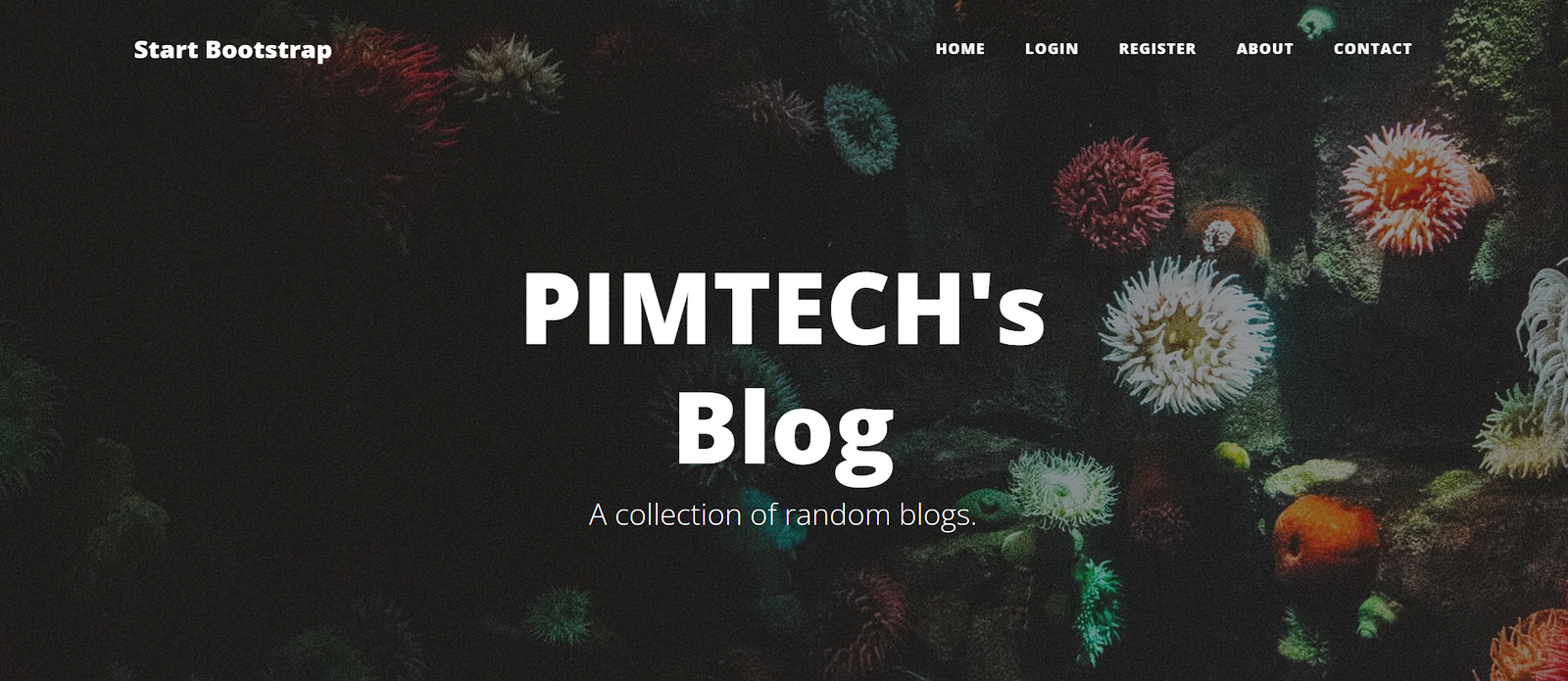
Backend Development: Powering the App with Flask
The backend is where things got really interesting. I used Flask to manage user authentication, store blog posts, and handle dynamic content generation.
Some of the critical tools I worked with:
🔹 Flask-Login for managing user authentication.
🔹 Flask-WTF for handling secure forms.
🔹 Flask-SQLAlchemy to interact with the database.
💡 What I Learned in Backend Development:
✅ Understanding Flask routing – Flask’s ability to map URLs to functions was a game-changer. For example, setting up routes to handle user registration:
@app.route("/register", methods=["GET", "POST"])
def register():
    form = RegisterForm()
    if form.validate_on_submit():
        existing_user = db.session.execute(
            db.select(User).where(User.email == form.email.data)
        ).scalar_one_or_none()
        if existing_user:
            flash("You've already signed up with that email, please log in instead!")
            return redirect(url_for("login"))
        hashed_password = generate_password_hash(
            form.password.data, method='pbkdf2:sha256', salt_length=8)
        new_user = User(
            email=form.email.data,
            password=hashed_password,
            name=form.name.data
        )
        db.session.add(new_user)
        db.session.commit()
        login_user(new_user)
        return redirect(url_for("get_all_posts"))
    return render_template("register.html", form=form)
✅ Database management with SQLAlchemy – SQLAlchemy simplified handling the database. Instead of writing raw SQL queries, I used models to interact with the database:
class BlogPost(db.Model):
    id = db.Column(db.Integer, primary_key=True)
    title = db.Column(db.String(250), nullable=False)
    subtitle = db.Column(db.String(250), nullable=False)
    date = db.Column(db.String(250), nullable=False)
    body = db.Column(db.Text, nullable=False)
    author = db.Column(db.String(250), nullable=False)
✅ Managing user authentication – Using Flask-Login, I secured my app and ensured that certain pages (like creating a post) were accessible only to authenticated users:
@login_manager.user_loader
def load_user(user_id):
    return db.session.get(User, int(user_id))
✅ Flask-WTF for form validation – Instead of handling user input manually, I used WTForms for cleaner and more secure forms:
class RegisterForm(FlaskForm):
    email = StringField("Email", validators=[DataRequired(), Email()])
    password = PasswordField("Password", validators=[DataRequired()])
    name = StringField("Name", validators=[DataRequired()])
    submit = SubmitField("Sign Up")
📌 Same Example as above: User Registration Code in Flask
@app.route("/register", methods=["GET", "POST"])
def register():
    form = RegisterForm()
    if form.validate_on_submit():
        existing_user = db.session.execute(
            db.select(User).where(User.email == form.email.data)
        ).scalar_one_or_none()
        if existing_user:
            flash("You've already signed up with that email, please log in instead!")
            return redirect(url_for("login"))
        hashed_password = generate_password_hash(
            form.password.data, method='pbkdf2:sha256', salt_length=8)
        new_user = User(
            email=form.email.data,
            password=hashed_password,
            name=form.name.data
        )
        db.session.add(new_user)
        db.session.commit()
        login_user(new_user)
        return redirect(url_for("get_all_posts"))
    return render_template("register.html", form=form)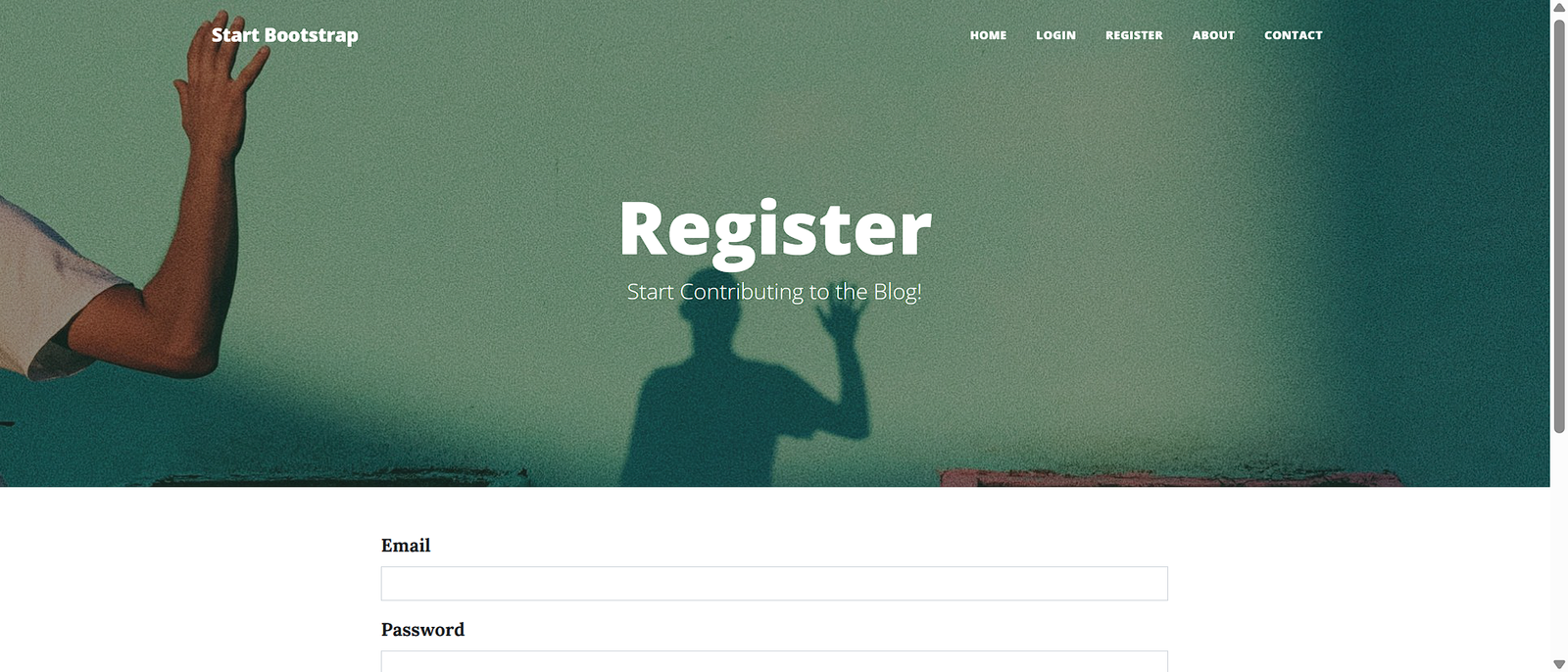
Bringing It All Together: A Full-Stack Web App
Integrating the frontend and backend was both rewarding and frustrating at times. The final app included:
📌 User Registration & Login – Secure sign-ups and logins.
📌 Comment System – Users could leave comments under posts.
📌 Admin Privileges – Certain actions were restricted to admin users like creating posts.
📌 Example: Blog Post Submission Code in Flask
@app.route("/new-post", methods=["GET", "POST"])
@admin_only
def add_new_post():
    form = CreatePostForm()
    if form.validate_on_submit():
        new_post = BlogPost(
            title=form.title.data,
            subtitle=form.subtitle.data,
            body=form.body.data,
            img_url=form.img_url.data,
            author=current_user.name,
            date=date.today().strftime("%B %d, %Y")
        )
        db.session.add(new_post)
        db.session.commit()
        return redirect(url_for("get_all_posts"))
return render_template("make-post.html", form=form) 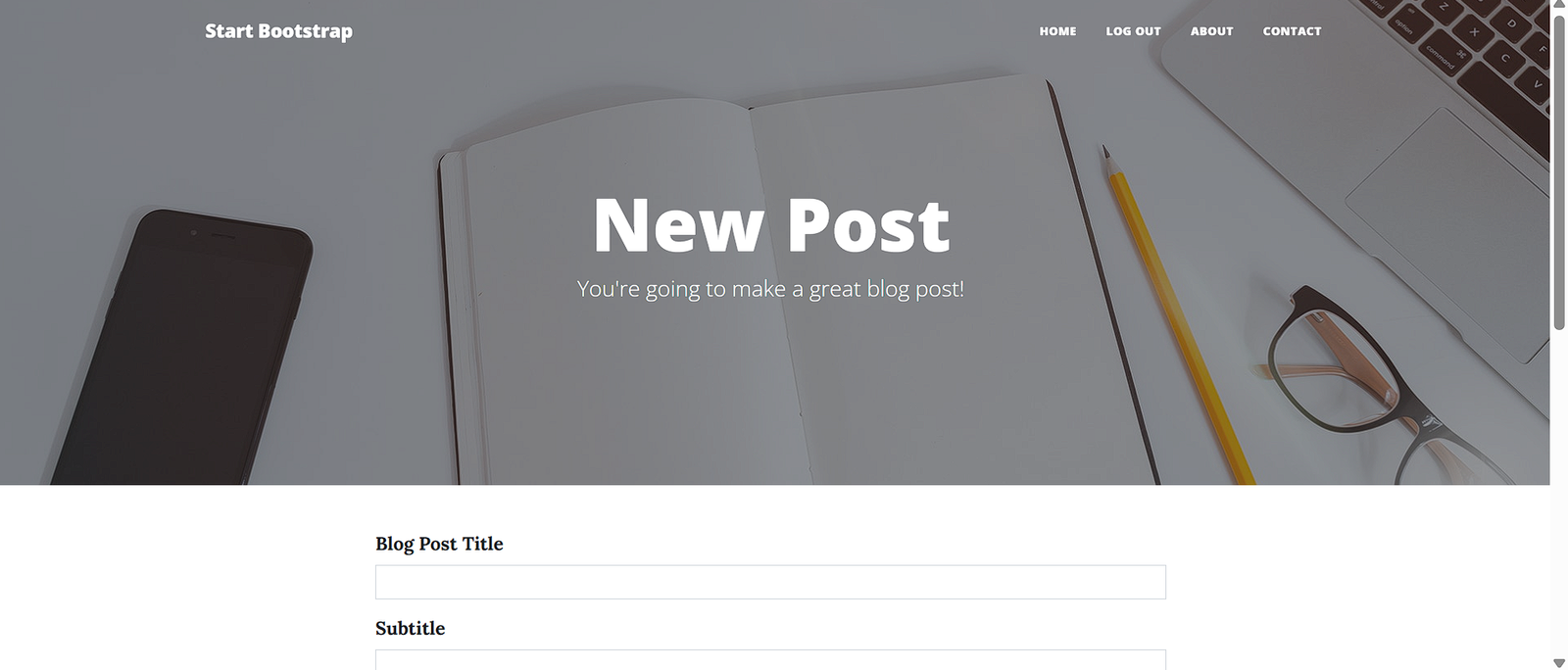
Some Challenges and How I Overcame Them
1. Handling User Authentication Securely
🔹 Challenge: Storing and verifying passwords securely.
✔ Solution: Used Werkzeug’s password hashing to encrypt passwords before storing them.
2. Making the Site Fully Responsive
🔹 Challenge: Ensuring a seamless experience across all devices.
✔ Solution: Leveraged Bootstrap’s grid system to make sure the layout adjusted dynamically.
3. Debugging Frontend and Backend Integration
🔹 Challenge: Forms weren’t submitting properly, and authentication was glitchy.
✔ Solution: Used Flask’s built-in debugging tools, browser DevTools, and printed everything to the console until I figured it out.
Key Takeaways
✅ Learning by doing is the best approach – Theory is great, but nothing beats actually building something.
✅ SQLAlchemy simplifies database management – Before this project, databases felt intimidating to me. But learning how to work with SQLAlchemy in Flask changed that. Instead of writing raw SQL queries, SQLAlchemy allows you to interact with the database using Python classes called models. This makes it easier to define relationships between users, posts, and comments, retrieve data, and manage complex queries efficiently.
✅ Flask is lightweight yet powerful – A fantastic framework for beginners to explore full-stack development.
✅ Deployment is an entirely different challenge – It’s one thing to get your app running on your local machine, but getting it online for others to use is another skill set entirely. I deployed my app using Render, which simplified the process, but I still had to learn about environment variables, database migrations, and production settings. Understanding deployment is an important step toward becoming a well-rounded developer.
✅ Problem-solving is the real skill – Debugging and troubleshooting are what truly define a developer.
✅ Understanding authentication is crucial – User authentication is something every developer needs to understand, whether you’re working with Flask, Django, Node.js, or any other framework. Learning how to hash passwords securely, manage sessions, and prevent vulnerabilities like SQL injection is a game-changer. I used Flask-Login and Werkzeug for authentication, but the principles I learned can be applied to any tech stack.
✅ Bootstrap makes frontend development much easier – If, like me, you aren’t a frontend expert, Bootstrap is a lifesaver. It allows you to create responsive, clean designs with minimal effort. Instead of writing custom CSS from scratch, you can use Bootstrap’s pre-built components like grids, modals, and navigation bars to build a beautiful UI quickly. This means you can focus more on functionality while still maintaining a professional-looking design.
This web app was a game-changer for me. It showed me that full-stack development isn’t some mysterious, unattainable skill, it’s just problem-solving one step at a time. This experience has made my passion for web development and technology in general grow, and I can’t wait to build more.
🚀 Next Steps: My plan is to replace placeholder content with real articles, add post categories, and implement better security features.
If you’re starting in web development, my advice is simple: Just build something. It doesn’t have to be perfect, it just has to exist.
💬 Have you ever built a web app? What was the hardest part? Drop a comment, I’d love to hear about it! Let’s connect and learn together. 🚀